Why You Need a Seating Chart Tool (And How EasyClass Makes It Easy)
By the EasyClass Team
Let's be honest—creating seating charts is tedious. You're juggling student personalities, learning needs, behavioral patterns, and that one pair of friends who absolutely cannot sit together. Then you do it all over again next week.
But here's the thing: research shows that student-selected seating leads to three times more disruption compared to teacher-assigned seating. Strategic seating arrangements aren't just busy work—they're one of your most powerful classroom management tools.
The problem? Creating thoughtful seating charts manually takes forever.
That's where EasyClass Seating Chart Generator comes in.
Why Seating Charts Actually Matter
Before we talk about the tool, let's talk about why this matters.
Classroom seating arrangements affect student learning, motivation, participation, attention, and teacher-student and student-student relationships. The research is clear:
- Better behavior: Students on the underachieving end of the spectrum showed the most improvement when classroom seating was developed with thought, rather than assigned randomly or alphabetically
- More engagement: Different classroom activities require different seating arrangements—row-based seating for individual work, group pods or semicircles for collaborative learning
- Reduced drama: Students appreciate the clarity and predictability of assigned seating, allowing them to focus on academics rather than the social scene
The bottom line? Student seating is one of the easiest, most cost-effective classroom management tactics available to teachers.
But creating effective seating charts is complex. You need to consider:
- Student behavior patterns
- Academic pairing (mixing ability levels for peer coaching)
- Social dynamics and conflicts
- Vision/hearing accommodations
- IEPs and 504 plans
- Classroom layout and desk configuration
Doing this manually with paper and pencil—or even with spreadsheets—is time-consuming and inflexible.
The Problem with Traditional Seating Charts
Paper charts:
- Hard to visualize
- Can't easily rearrange
- No way to save multiple configurations
- Time-consuming to recreate each time
Spreadsheets:
- Better than paper, but still clunky
- Difficult to visualize desk layouts
- Manual work to track student information
- No smart suggestions
What teachers really need is a tool that makes seating charts quick, visual, and adaptable.
How EasyClass Seating Chart Generator Works
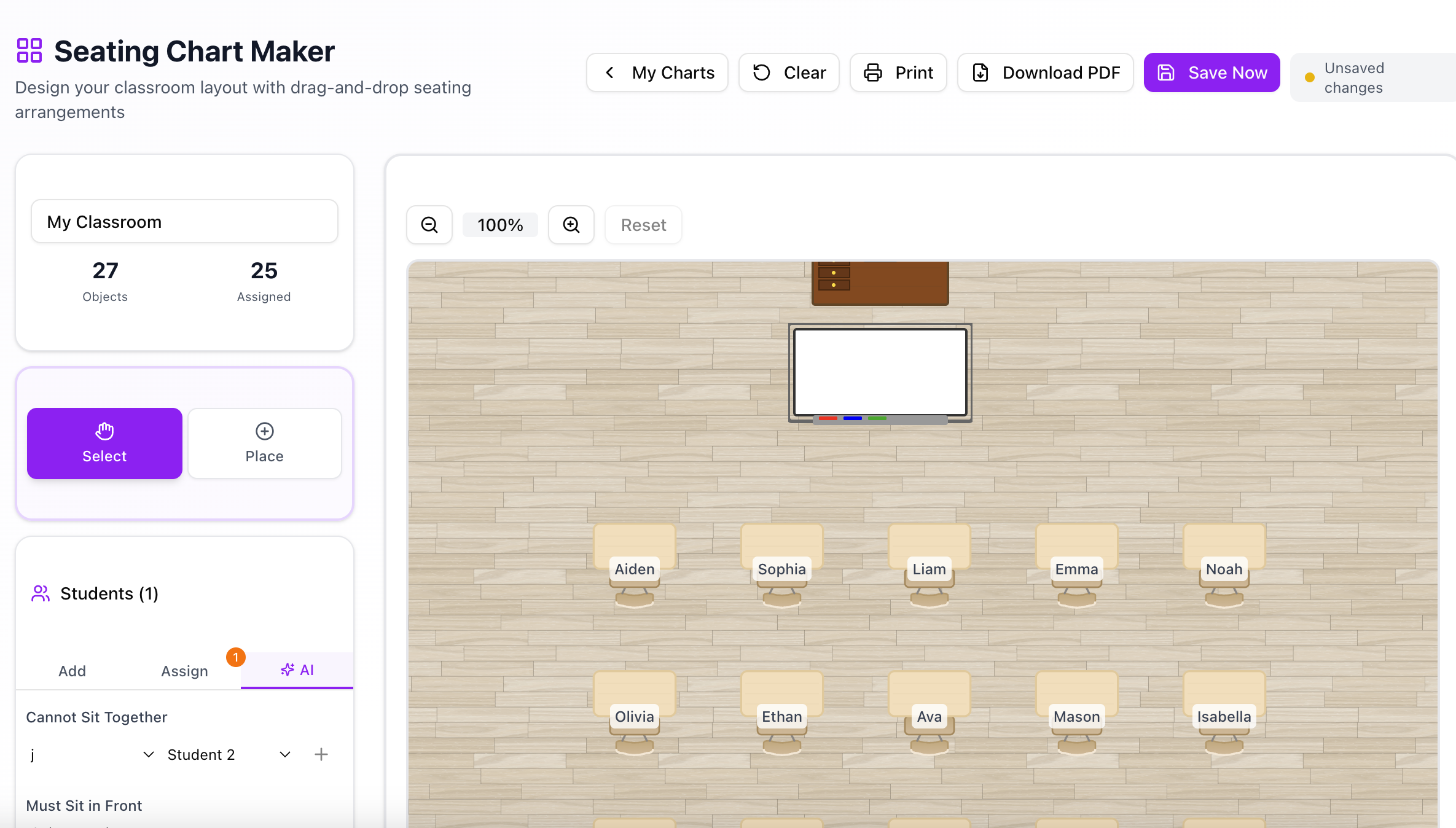
EasyClass makes creating seating charts as simple as drag-and-drop. Here's how:
1. Choose Your Classroom Layout
Select from common desk configurations:
- Rows
- Groups/pods
- U-shape/horseshoe
- Pairs
- Custom layouts
Or create your own custom layout to match your actual classroom.
2. Add Your Students
Import your class roster from:
- Google Classroom (automatic sync)
- Manual entry
- CSV upload
3. Drag and Drop to Arrange
The visual interface lets you:
- Drag student names to desks
- See the entire layout at a glance
- Rearrange instantly
- Color-code students (IEPs, behavior notes, ability levels)
4. Use AI Auto-Assignment (Optional)
Here's where it gets powerful. EasyClass can automatically assign seats based on your criteria:
Tell the AI what matters:
- "Separate these two students"
- "Mix high and low performers"
- "Put students with vision needs in front"
- "Create diverse groups"
- "Avoid seating these friends together"
AI generates optimized seating in seconds based on:
- Behavioral notes you've added
- Academic performance data
- Your specific instructions
- Classroom management goals
Don't like the result? Regenerate with one click or manually adjust.
5. Save Multiple Versions
Create different seating charts for:
- Different subjects
- Different activities (independent work vs. group projects)
- Different times of year
- Sub plans
Switch between saved charts instantly.
6. Share and Print
- Print visual seating charts for your desk
- Share with substitute teachers
- Export to Google Classroom
- Display on your screen during class
Real Use Cases
For daily classroom management:
Create your main seating chart with behavioral considerations, then save alternate versions for test days (more space between students) and project days (grouped by team).
For differentiation:
Use color-coding to track which students need specific accommodations, then arrange seating to support those needs—visual learners near the board, students who need movement breaks near the door, etc.
For collaborative learning:
Grouping high-level and low-level learners together facilitates peer coaching, and heterogeneous groups help each other in the learning process. Use AI assignment to create balanced groups automatically.
For changing needs:
As classroom dynamics shift throughout the year, quickly create new seating charts without starting from scratch. Your student information and notes carry over.
Key Features
✅ Visual drag-and-drop interface - See your classroom layout as you build it
✅ AI-powered seat assignment - Smart suggestions based on your criteria
✅ Multiple saved layouts - Different charts for different purposes
✅ Student notes and color-coding - Track important information at a glance
✅ Google Classroom integration - Import rosters automatically
✅ Print and share - Easy distribution to subs and colleagues
✅ Mobile-friendly - Create and edit charts from any device
Why EasyClass vs. Other Options
Other seating chart tools typically offer basic drag-and-drop but lack the intelligence layer. You're still making all the decisions manually.
EasyClass combines:
- Intuitive visual design (easy to use)
- Smart AI suggestions (saves you thinking time)
- Full customization (you're always in control)
- Integration with your workflow (Google Classroom, printing, etc.)
You get the speed of automation with the control of manual arrangement.
Getting Started
Ready to stop wasting time on seating charts?
- Sign up for EasyClass - Free trial available
- Import your class roster - Takes 30 seconds with Google Classroom
- Choose a layout - Select from templates or create custom
- Add student info - Notes on behavior, accommodations, etc.
- Let AI arrange or do it manually - Your choice
Most teachers create their first optimized seating chart in under 10 minutes.
The Bottom Line
The seating chart is an underrated tool that can help turn a good learning environment into a great one.
But creating thoughtful, strategic seating arrangements shouldn't take hours of your time. With EasyClass Seating Chart Generator, you get:
- Visual, intuitive design
- AI-powered smart suggestions
- Flexibility to adjust on the fly
- Time saved every week
Stop wrestling with paper charts and spreadsheets. Let EasyClass handle the heavy lifting so you can focus on teaching.
Try EasyClass Seating Chart Generator Free →
Have questions? Contact our team for help getting started.