AI grading

The AI essay grader that uses your rubric, and you approve every score

EasyClass is an AI grader for teachers that scores student writing against your rubric, highlights the sentences behind each score, and drafts the feedback. Nothing goes back to a student until you approve it.

Free plan · 50 papers free · No credit card

TODO
  • 50 papersgraded free on the free plan, and the sample essays never count
  • Every scoreshows the quotes from the paper that earned it
  • Your approvalcomes before any grade or comment reaches a student
  • Google Classroombring papers in, then send approved grades back

Grading should not eat your Sunday

A class set of essays is hours of reading, and the hardest part is staying fair from the first paper to the thirtieth. Paste an essay into a chatbot and you get a number and a paragraph you have to take on trust.

EasyClass works the other way. It shows its reasoning for every criterion, points you to the few papers that really need a second read, and leaves the final call to you. You spend your time on the judgment calls, not on the stack.

How AI essay grading works in EasyClass

Three steps from a stack of papers to feedback in your students’ hands.

  1. Add the papers and your rubric

    Drop in files (PDF, Word, text, or phone photos of handwritten work), paste the essays, or pull them from Google Drive or Google Classroom. Pick your rubric, the grade level, and how strict and how chatty the feedback should be.

  2. Let it grade

    Each paper is scored criterion by criterion, with quotes from the student’s writing and a drafted comment. You can close the tab. Grading keeps going and we email you when it’s done.

  3. Check, approve and return

    Start with the papers flagged for you, change any score or comment, and approve. Then share private feedback links or send the grades to Google Classroom.

Anatomy of a graded paper

What you see before you approve a score

This is one of the made-up sample essays, graded with the SBAC opinion writing rubric. It’s what the review screen shows for every paper in your stack.

Leo T.Grade 5 · Four-day school weekC 71% · 10/14

I dont think we should have a four day week. Because it would be bad.

My mom works on fridays and I would have to stay home by myself or go to my aunts house. Also the days would be longer and that is boring. We already sit a lot.

Also we might forget stuff over a long weekend. I forget my spelling words over the weekend already.

So no four day week.
Rubric

  • Statement of Purpose/FocusMeets3/4
  • OrganizationMeets3/4
  • Evidence/ElaborationApproaching2/4
  • ConventionsMeets2/2

Double-check Evidence/Elaboration: it was between Approaching and Meets

Why The paper gives several relevant reasons and personal examples, but support is brief and uneven. It does not develop the reasons enough for Meets.

  1. The quotes behind the score

    Each criterion underlines the sentences it used, in its own color. Quotes that aren’t really in the paper are thrown out.

  2. A level, and why

    The level comes with a reason that says why it isn’t the level above or below.

  3. Close calls are flagged

    When a score was between two levels, the paper goes to Needs a look with one plain reason.

  4. Your words go back

    Change the level or rewrite the comment. Nothing reaches the student until you approve.

AI rubric grading

AI rubric grading that shows its evidence

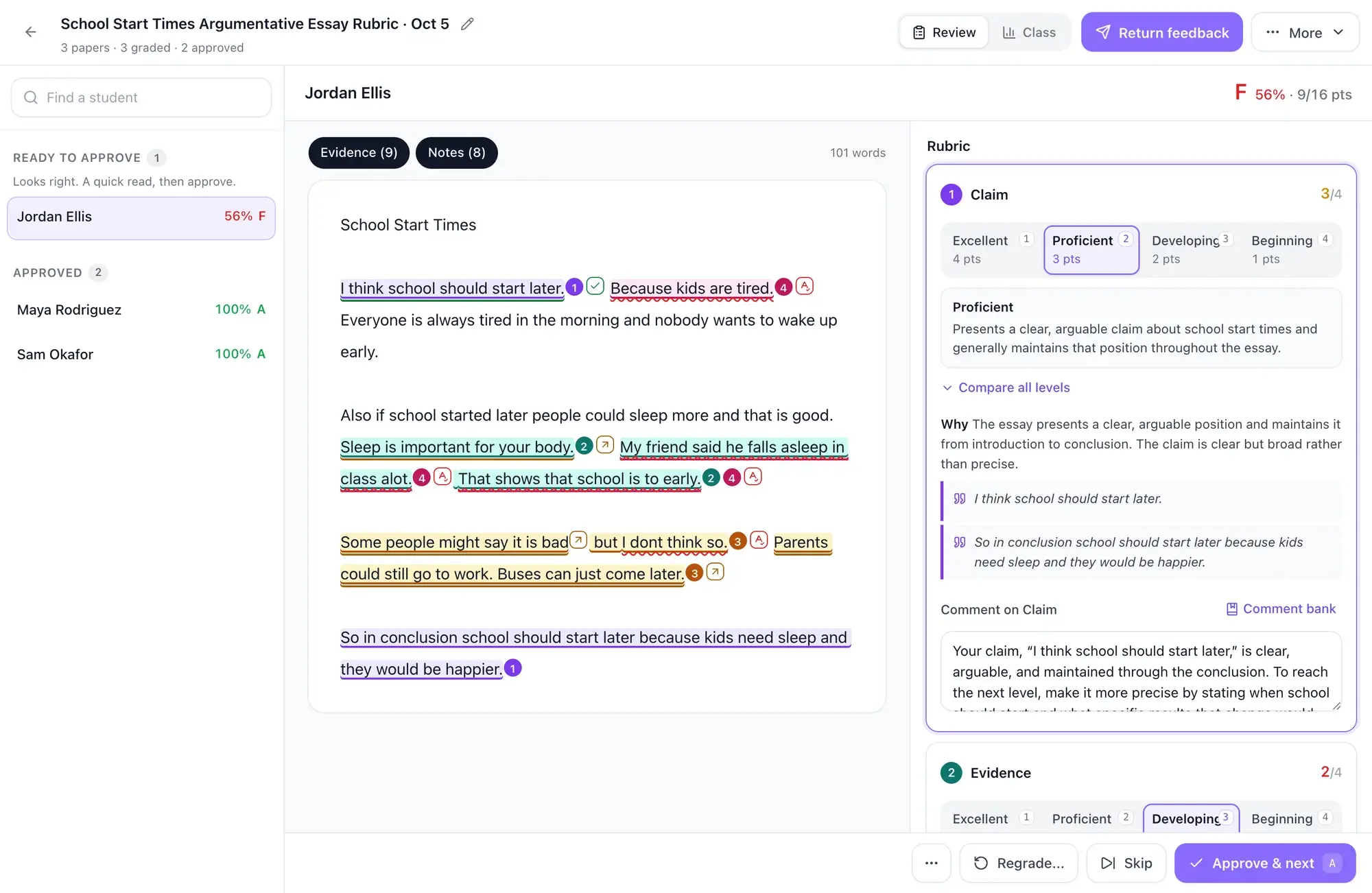
For every criterion, EasyClass quotes the student’s own sentences, picks a level, and says why it isn’t the level above or below. The quotes are highlighted right in the paper, and any quote that isn’t really in the paper is thrown out. When a criterion is a close call, it gets a second look before you see it, and if the two readings differ the paper is flagged for you.

  • Evidence highlighted in the student’s writing, criterion by criterion
  • A second look on close calls and on scores near a letter-grade line
  • Dialect, English-learner features and spelling only count under a conventions criterion

Rubric generator

Build or paste your rubric

Use the rubric you already have, or make one in a minute. Paste it in or upload it as a Word file or PDF and EasyClass reads it into criteria and levels. Or describe the assignment in a sentence and the AI writes a rubric for you to edit. You can also start from the standards library and filter by state.

  • Paste or upload your own rubric (.docx, PDF or text)
  • Describe the assignment and get a rubric draft
  • Hints when levels are vague, overlap or share the same points
  • A warning when the rubric doesn’t seem to fit the papers
  • Grading with a state test rubric? Browse rubrics by state: STAAR, Smarter Balanced, B.E.S.T., ACAP and AP

Review in minutes

Review the papers that need you first

Papers sort into three lanes. Needs a look lists each flagged paper with one plain reason, like “Double-check Evidence and Reasoning: it was between Approaching and Meets” or “Very short (41 words).” Ready to approve holds the rest: spot-check three we pick at random, then approve the others in one click. Approved is everything you’ve signed off.

  • Change any score or comment, or pull one from your comment bank
  • Fix once for many: write one comment for every paper that missed the same thing
  • A “Matches you” meter shows how often you kept the AI’s scores
  • Your corrections become examples for later papers on the same rubric

Reteach groups

Turn grades into a reteach plan

The class view groups students by the criterion they scored lowest on, using approved grades by default. Each group gets one-click buttons that open EasyClass chat with the request already typed in: a mini-lesson, an exit ticket or practice slides for that skill. Student names are left out of the request, and nothing is sent until you press send.

Google Classroom

AI grading for Google Classroom

Connect Google Classroom, pick a course and an assignment, and EasyClass brings in what students turned in. When you’re done, send the approved grades back. For assignments you posted from EasyClass, grades go straight into Classroom as drafts, or returned to students if you choose. For assignments made in Classroom itself, Google doesn’t let other apps set grades, so you download a Classroom CSV with names and points instead.

  • Import Google Docs and short answers turned in to an assignment
  • Only approved papers are ever sent
  • A gradebook CSV for any other system

Feedback students use

AI feedback on student writing that students act on

Each student gets a private link with your approved scores, the evidence, and your comments. You can turn on two extras. With revise and resubmit, students send a new draft and see an AI estimate of how it would score, while their grade changes only if you change it. With Ask about my feedback, a short chat explains your comments and never writes for them or changes a grade.

  • A link is only made once you approve the paper
  • Students see the quotes behind each score
  • Turn either extra on or off for the whole assignment

Try it on sample essays first

Pick one of four sample assignments and it opens already graded, with made-up student papers and a matching rubric from the standards library. You see the full review screen in seconds. Samples are free and never count toward your 50 papers.

  • Grade 5 ELA

    Opinion essays

    Short opinion pieces graded with the Smarter Balanced opinion rubric for grades 3–5: organization and purpose, evidence and elaboration, and conventions.

  • Grade 7 ELA

    Argument essays

    Graded with the Common Core Argument Writing Rubric (Grades 6-8). Claim and focus, evidence and reasoning: the kind of essay where Approaching or Meets is a real judgment call.

  • Grade 8 science

    Science CER

    Claim, evidence and reasoning responses graded with the Connecticut NGSS Science Writing Rubric, including whether the evidence really backs the claim.

  • Grade 8 US history

    History short answers

    Short constructed responses graded with the Texas STAAR Science and Social Studies rubric, a single-criterion rubric for quick checks.

Who uses an AI grader for teachers

ELA

  • Opinion, argument and narrative essays on your writing rubric
  • Comments that name one next step instead of a wall of notes
  • Students revise and resubmit before the final grade

Science

  • CER responses and lab conclusions
  • Photos of handwritten answers, with hard-to-read spots flagged
  • Reteach groups for the students who missed the reasoning step

Social studies and history

  • Short answers and source analysis
  • DBQ-style responses scored on use of evidence
  • A Classroom CSV ready for your gradebook

Every subject

  • Grade levels from kindergarten to college
  • English learners not marked down outside a conventions criterion
  • Feedback tone and length set the way you like it

EasyClass vs a general chatbot for grading

You can paste an essay into a chatbot and ask for a grade. Here is what changes when the grader is built for a class set.

EasyClassA general chatbot
Your rubricSaved once, used for every paper the same wayPasted again in every chat
Why a scoreQuotes from the paper for each criterion, checked against the textA summary with nothing to check it against
Close callsA second look, then flagged for youNo way to tell a sure score from a guess
A class setUp to 200 papers in one assignment, reviewed in lanesOne essay per message
Student namesRoster names kept out of what the AI seesWhatever you paste
Returning workPrivate feedback links and Google Classroom, after you approveCopy and paste each comment

You are the grader. The AI drafts.

Every score is a draft until you approve it. A student can’t open feedback, and no grade goes to Google Classroom, before you sign off on that paper. We don’t attach student names from your roster to what the AI sees (names written on the paper itself are read as part of the work), and we don’t train AI models on student work. Read our privacy policy.

  • Approve before return, on every paper
  • Any score you change stays yours and is never overwritten
  • The writing-pattern check (AI detection) is advisory only, never a verdict
  • Revisions and the feedback chat never change a grade

Questions teachers ask

Is there a free AI grader plan?

Yes. The free plan grades 50 student papers with AI, with no credit card needed. The sample essays are free and don’t count toward the 50. When you need more, EasyClass Pro lifts the 50-paper limit and gives each student five graded revisions per paper instead of two.

Does the AI give the final grade?

No. You do. The AI drafts a score and comment for each criterion, and nothing reaches a student or Google Classroom until you approve that paper. You can change any score or comment first, and a score you change is never overwritten by the AI.

How accurate is AI essay grading?

It is close enough to save you hours, and not accurate enough to skip your review, which is why approval is built in. EasyClass shows the evidence for every score and flags close calls so you know where to look. We wrote up what the research says about AI grading accuracy.

Can I use my own rubric?

Yes. Paste your rubric or upload it as a Word file, PDF or text file, and EasyClass turns it into criteria and levels you can edit. You can also describe the assignment and let the AI draft a rubric, or start from the standards library.

Does it work with Google Classroom?

Yes. You can import the papers turned in to a Classroom assignment and send approved grades back. Google only lets the app that made an assignment set its grades, so passback works for assignments you posted from EasyClass. For the rest, download the Classroom CSV.

Can it grade handwritten work?

Yes. Upload photos or scans of handwritten papers, including iPhone photos, and EasyClass reads the writing before grading. You can join several pages into one student’s paper. When the handwriting was hard to read in places, the paper is flagged so you can check it.

Is student data safe?

We don’t attach student names from your roster to what the AI sees (names written on the paper itself are read as part of the work), and we don’t train AI models on student work. Feedback is shared by private links only after you approve it, and you can turn a link off at any time. See the privacy policy for the details.

Does EasyClass detect AI-written essays?

It has a writing-pattern check, but it is advisory only. AI detectors make mistakes, so EasyClass never treats the check as proof and never changes a grade because of it. Use it as one clue alongside what you know about the student.

Painted children walking up the path to a schoolhouse on a hill

Grade the next stack in an afternoon, not a weekend.

Start with the sample essays, then grade 50 of your own papers free. You approve every score.